
MGB version 4.3 was developed for use with the most stable version available of QGIS software (3.4.14 ‘Madeira’). Also, small corrections were made to the rain raster creation file.
Regarding the IPH HydroTools plugin, it also works for the QGIS version 3.4.14 ‘Madeira’.
Download:
User’s guides:
User’s guide MGB 4.3 (portuguese version) User’s guide IPH Hydro Tools (portuguese version)
User’s guide MGB 4.3 (spanish version)

Floodplains in Niger River, in Africa, simulated with the inertial module. Source: Fleischmann et al. (2018)

Observed discharge (black line), discharge calculated by Muskingum-Cunge (green line) and discharge calculated by inertial module (orange line)at Conceição do Araguaia gauging station, in Araguaia River. Source: Pontes et al. (2015).
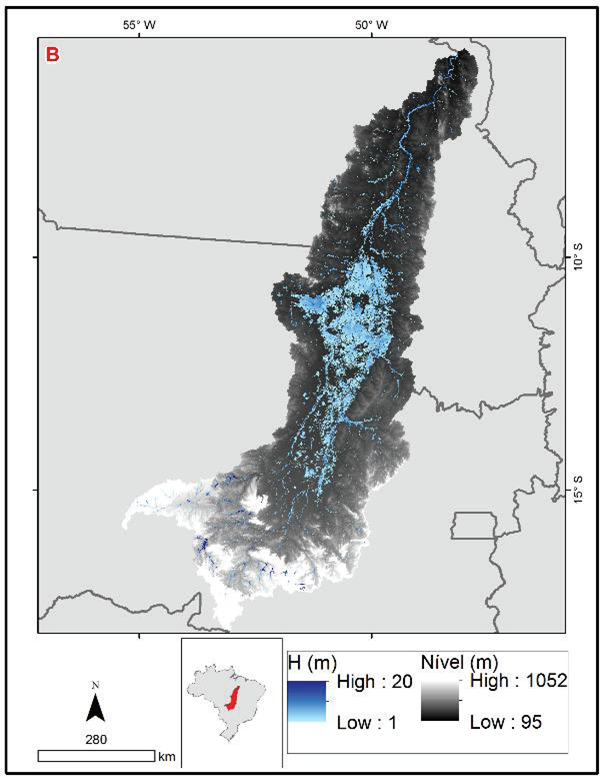
Floodplains in Araguaia River simulated with inertial module. Source: Pontes et al. (2015)
Downloads
MGB model requires Quantum GIS in 64 bits version.
MGB model is a plugin which is added to Quantum GIS after the software has been installed in the computer. To install the MGB plugin in Quantum GIS, download the plugin in the provided link, then unpack the plugin file, so you should have a folder named “MGB”, and a sub-folder with all files related to MGB.
Afterwards, go to “\plugins” directory inside the folder in which Quantum GIS has been intalled. Usually, it is installed in the path: “C:\Users\.qgis\python”. Then, go to “plugins” folder. In case this folder doesn’t exist, you should create it.
Finally, paste the unpacked “MGB” folder inside the “plugins” folder. Same procedure for “IPH-hydrotools” folder.
An english version for user’s guide MGB 4.0 is under construction. Temporarily, we provide the english version for the previous version 3.0 of MGB (MapWindow), as follows:
MGB-IPH 2017 application manual
Source CODE (FORTRAN):